# Permissions

### Overview

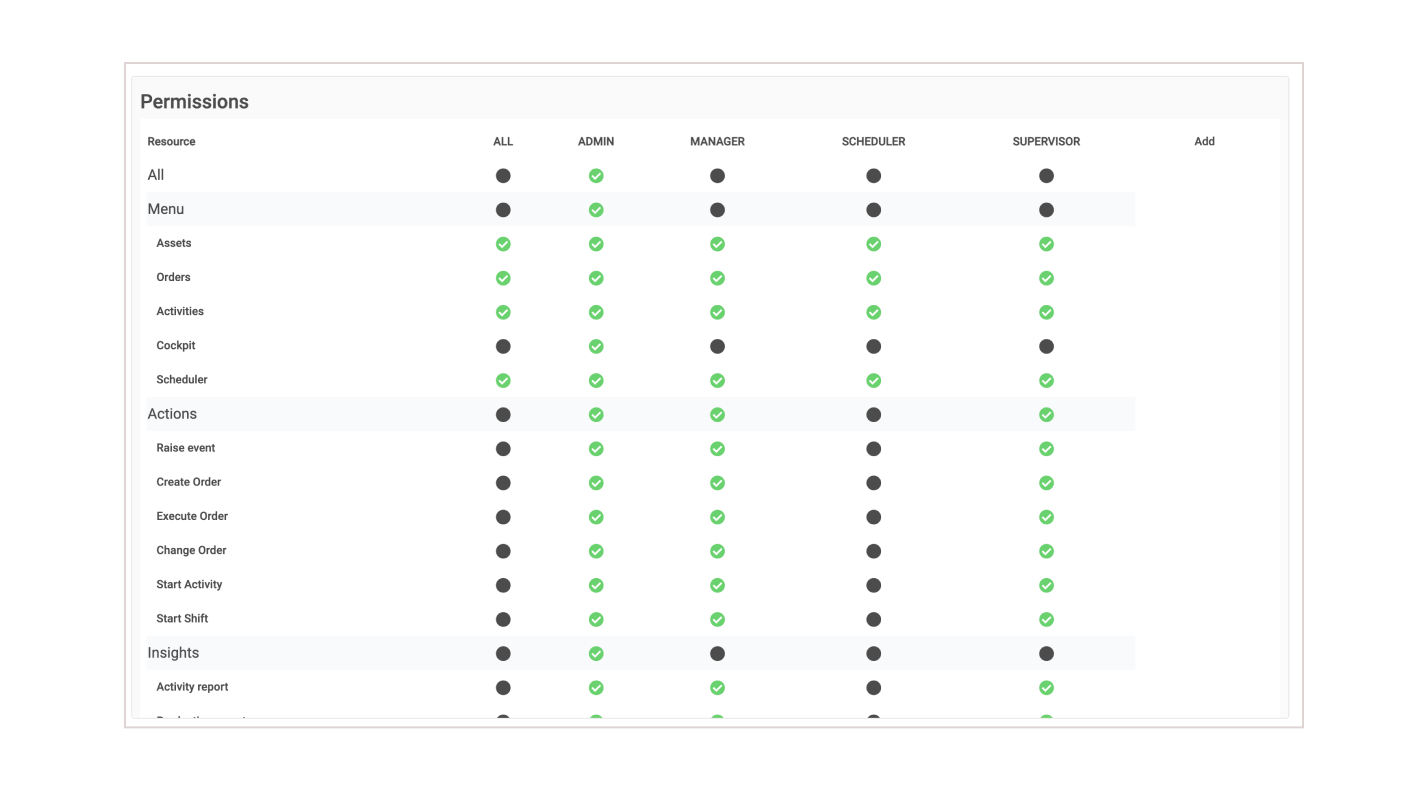
The permissions table provides an easy to use but powerful way to assign permissions/abilities to specific User groups.

### Navigation

{% hint style="info" %}
Navigation: ***Users > Permissions***
{% endhint %}

On initial deployment there will be five (5) Roles that can get you started.

* Admin
* Manager
* Supervisor
* Operator
* Scheduler

{% hint style="info" %}
Scheduler is for service accounts for the TilliT Scheduler software. Admin is often required for service accounts as well. All other roles are for users.
{% endhint %}

\
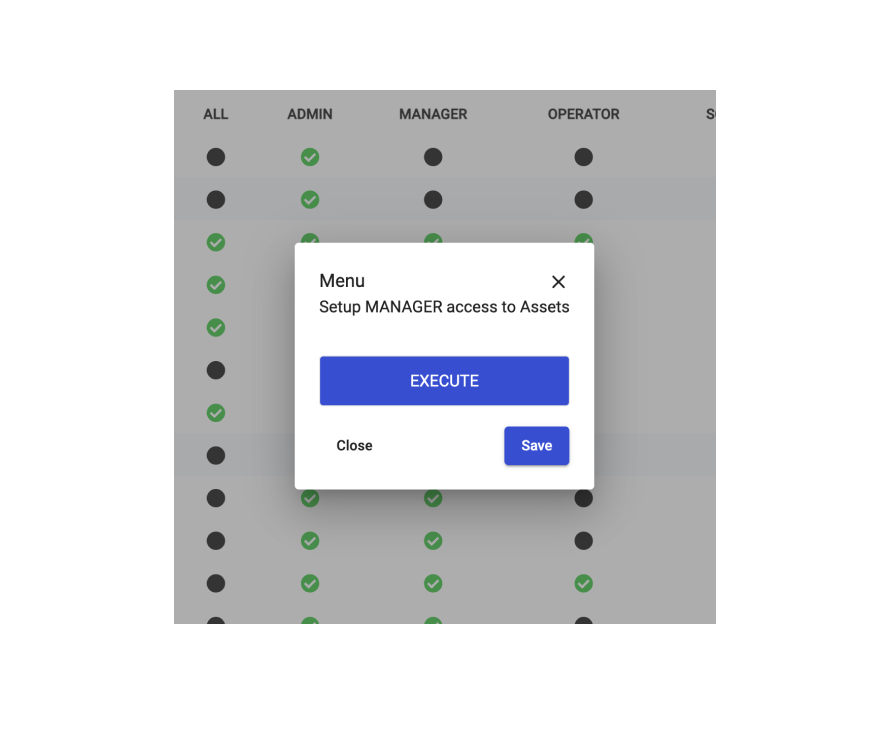
Below is a matrix of the permissions for each role. To assign a permissions simple click on the resource dot. Click on the Execute button to toggle on/pfff the selection. Click on Save.

<figure><img src="/files/ZFh3YpuO4HQTWLjrQ4Ed" alt=""><figcaption></figcaption></figure>

<figure><img src="/files/tudNGydRsYye75WQJmaU" alt=""><figcaption></figcaption></figure>

## Permissions Table

| **ALL**                | Access to everything.                                                                                                                    |
| ---------------------- | ---------------------------------------------------------------------------------------------------------------------------------------- |
| **MENU**               | Access to the main sidebar menu.                                                                                                         |
| Assets                 | Access to Assets from the main sidebar menu.                                                                                             |
| **Orders**             | Access to Orders from the main sidebar menu.                                                                                             |
| **Activities**         | Access to Activities from the main sidebar menu.                                                                                         |
| **Cockpit**            | Access to Cockpit from the main sidebar menu.                                                                                            |
| **Scheduler**          | Access to Scheduler from the main sidebar menu.                                                                                          |
| **Asset Meter**        | Access to Asset Meter from the main sidebar menu.                                                                                        |
| **ACTIONS**            | Access to all Actions                                                                                                                    |
| **Raise event**        | Access to raising events manually.                                                                                                       |
| **Create Order**       | Access to creating an order from the Actions drop down.                                                                                  |
| **Execute Order**      | Access to order actions like Ready, Start, etc.                                                                                          |
| **Change Order**       | Permission to change order detail when an order is New, Ready or Suspended.                                                              |
| **View Order Details** | Access to Order's Details                                                                                                                |
| **Start Activity**     | Able to start an activity from the Actions rop down.                                                                                     |
| **Start Shift**        | Able to start or changeover shifts.                                                                                                      |
| **Change Downtime**    | Permission to edit downtimes in downtime tables                                                                                          |
| **INSIGHTS**           | Access to all Insights from sidebar menu.                                                                                                |
| **Activity report**    | Access to Activity Report                                                                                                                |
| **Production report**  | Access to Production Report                                                                                                              |
| **Dashboards**         | Access to Dashboards                                                                                                                     |
| **Analytics**          | Access to Analytics                                                                                                                      |
| **USER MANAGEMENT**    | Access to all users settings                                                                                                             |
| **Users**              | Access to Users                                                                                                                          |
| **Groups**             | Access to Groups                                                                                                                         |
| **Permissions**        | Access to Permissions matrix                                                                                                             |
| **SETTINGS**           | Access to all Settings                                                                                                                   |
| **Assets**             | Access to Assets Hierarchy                                                                                                               |
| **Materials**          | Access to Materials Definition                                                                                                           |
| **Articles**           | Access to Articles                                                                                                                       |
| **Activity Template**  | Access to Activity Templates                                                                                                             |
| **Scheduler**          | Access to Scheduler Settings                                                                                                             |
| **Edge**               | Access to Edge                                                                                                                           |
| **Integration**        | Access to Integration                                                                                                                    |
| **CONFIGURATION**      | Access to all Configurations (Report Templates, , Attributes etc)                                                                        |
| **Audit Log**          | Access to Audit Logs                                                                                                                     |
| **BOARDS**             | Access to all Boards settings                                                                                                            |
| **Board**              | Access to Boards                                                                                                                         |
| **Board Item**         | Access to Board Items.                                                                                                                   |
| **HISTORY**            | Access to all History logs                                                                                                               |
| **Orders**             | Access to Orders History logs                                                                                                            |
| **Activities**         | Access to Activities History logs                                                                                                        |
| **Shifts**             | Access to Shifts History logs                                                                                                            |
| **Timeline**           | Access to Timeline History logs                                                                                                          |
| **SCHEDULER**          | Access to Scheduler features                                                                                                             |
| **Data Template**      | Access to Data Templates                                                                                                                 |
| **Scenario**           | Access to Scenarios (under data templates)                                                                                               |
| **Order**              | Access to Planned Orders                                                                                                                 |
| **Forecast**           | (Currently not available) Access to Forecast feature in Scheduler where you can predict future throughput based on your historical data. |


---

# Agent Instructions: Querying This Documentation

If you need additional information that is not directly available in this page, you can query the documentation dynamically by asking a question.

Perform an HTTP GET request on the current page URL with the `ask` query parameter:

```
GET https://help.tillit.cloud/tillit/knowledge-base/users/permissions.md?ask=<question>
```

The question should be specific, self-contained, and written in natural language.
The response will contain a direct answer to the question and relevant excerpts and sources from the documentation.

Use this mechanism when the answer is not explicitly present in the current page, you need clarification or additional context, or you want to retrieve related documentation sections.