> For the complete documentation index, see [llms.txt](https://help.tillit.cloud/tillit/llms.txt). Markdown versions of documentation pages are available by appending `.md` to page URLs; this page is available as [Markdown](https://help.tillit.cloud/tillit/knowledge-base/setting-up-tillit/configuration/dashboard-group.md).

# Dashboard Group

Group Dashboards to add more control.

## Overview

Grouping dashboards give more control over navigation.

## Navigation

Go to ***Settings -> Configuration -> Dashboard Groups***

<figure><img src="https://352909507-files.gitbook.io/~/files/v0/b/gitbook-x-prod.appspot.com/o/spaces%2FrNT40XJFAFlAhUX8CcQS%2Fuploads%2FC3Hu2BN9JrG8ISeuVINr%2Fimage.png?alt=media&amp;token=66881471-1a69-440e-90fe-26d2364e0199" alt="" width="106"><figcaption></figcaption></figure>

or ***Insights -> Dashboards***

<figure><img src="https://352909507-files.gitbook.io/~/files/v0/b/gitbook-x-prod.appspot.com/o/spaces%2FrNT40XJFAFlAhUX8CcQS%2Fuploads%2FW7jIiZP6tq1svTI2udD5%2Fimage.png?alt=media&amp;token=3255fdb2-5d17-473c-8a06-8b98856d72be" alt="" width="121"><figcaption></figcaption></figure>

### Creating a new ***Dashboard Group***

{% stepper %}
{% step %}
Click on ***Create***.

<figure><img src="https://352909507-files.gitbook.io/~/files/v0/b/gitbook-x-prod.appspot.com/o/spaces%2FrNT40XJFAFlAhUX8CcQS%2Fuploads%2FNnjZZTKXkZXWeGYfcRhL%2Fimage.png?alt=media&amp;token=06f2c766-86f9-4083-8e3f-154aa364427b" alt=""><figcaption><p><em><strong>From Settings -> Configuration -> Dashboard Group</strong></em></p></figcaption></figure>

<figure><img src="https://352909507-files.gitbook.io/~/files/v0/b/gitbook-x-prod.appspot.com/o/spaces%2FrNT40XJFAFlAhUX8CcQS%2Fuploads%2F7EINJlAK6vBU24xJTDCQ%2FIMG.png?alt=media&amp;token=79cb1a94-221e-4507-8082-0d60de89d7a8" alt=""><figcaption><p><em><strong>From Insights -> Dashboards</strong></em></p></figcaption></figure>
{% endstep %}

{% step %}
You will be presented with a pop-up. Fill in the required fields.

<figure><img src="https://352909507-files.gitbook.io/~/files/v0/b/gitbook-x-prod.appspot.com/o/spaces%2FrNT40XJFAFlAhUX8CcQS%2Fuploads%2FjkY8GaK2AdVcQtBHUtLa%2Fimage.png?alt=media&amp;token=c7eb1a0b-4e14-4b67-b4ac-6ba65fbd300b" alt=""><figcaption></figcaption></figure>
{% endstep %}

{% step %}
Click **Save and close** (or **Save and open**) to finalise.
{% endstep %}
{% endstepper %}
### **Fields**

| Name          | Description                                                                            |
| ------------- | -------------------------------------------------------------------------------------- |
| Name \*       | The name of the group                                                                  |
| Display Order | Determines the position of the group in the dashboard list. Lower numbers appear first |

## Editing Dashboard Group

{% stepper %}
{% step %}
Click on the group you want to edit.

<figure><img src="https://352909507-files.gitbook.io/~/files/v0/b/gitbook-x-prod.appspot.com/o/spaces%2FrNT40XJFAFlAhUX8CcQS%2Fuploads%2F7hZJrC31wbtnFX41vXUr%2Fimage.png?alt=media&amp;token=b4e9ff7f-0026-410a-b0a7-8ce68876b44f" alt=""><figcaption></figcaption></figure>
{% endstep %}

{% step %}
Edit the desired information in the Basic Information section of the group.

<figure><img src="https://352909507-files.gitbook.io/~/files/v0/b/gitbook-x-prod.appspot.com/o/spaces%2FrNT40XJFAFlAhUX8CcQS%2Fuploads%2FIQSgA1TyTphWXLyaEylv%2Fimage.png?alt=media&amp;token=6e8b05ae-8b77-4f8b-8f25-1d93a3bea21f" alt=""><figcaption></figcaption></figure>
{% endstep %}
{% endstepper %}

## Deleting Dashboard Groups

{% hint style="info" %}
To do this, **make sure you have deleted all dashboards within that group** by following [these steps](/tillit/knowledge-base/reports/dashboards.md#deleting-dashboards).
{% endhint %}

{% stepper %}
{% step %}
Go to ***Settings -> Configuration -> Dashboard Groups***

<figure><img src="https://352909507-files.gitbook.io/~/files/v0/b/gitbook-x-prod.appspot.com/o/spaces%2FrNT40XJFAFlAhUX8CcQS%2Fuploads%2FC3Hu2BN9JrG8ISeuVINr%2Fimage.png?alt=media&amp;token=66881471-1a69-440e-90fe-26d2364e0199" alt="" width="106"><figcaption></figcaption></figure>
{% endstep %}

{% step %}
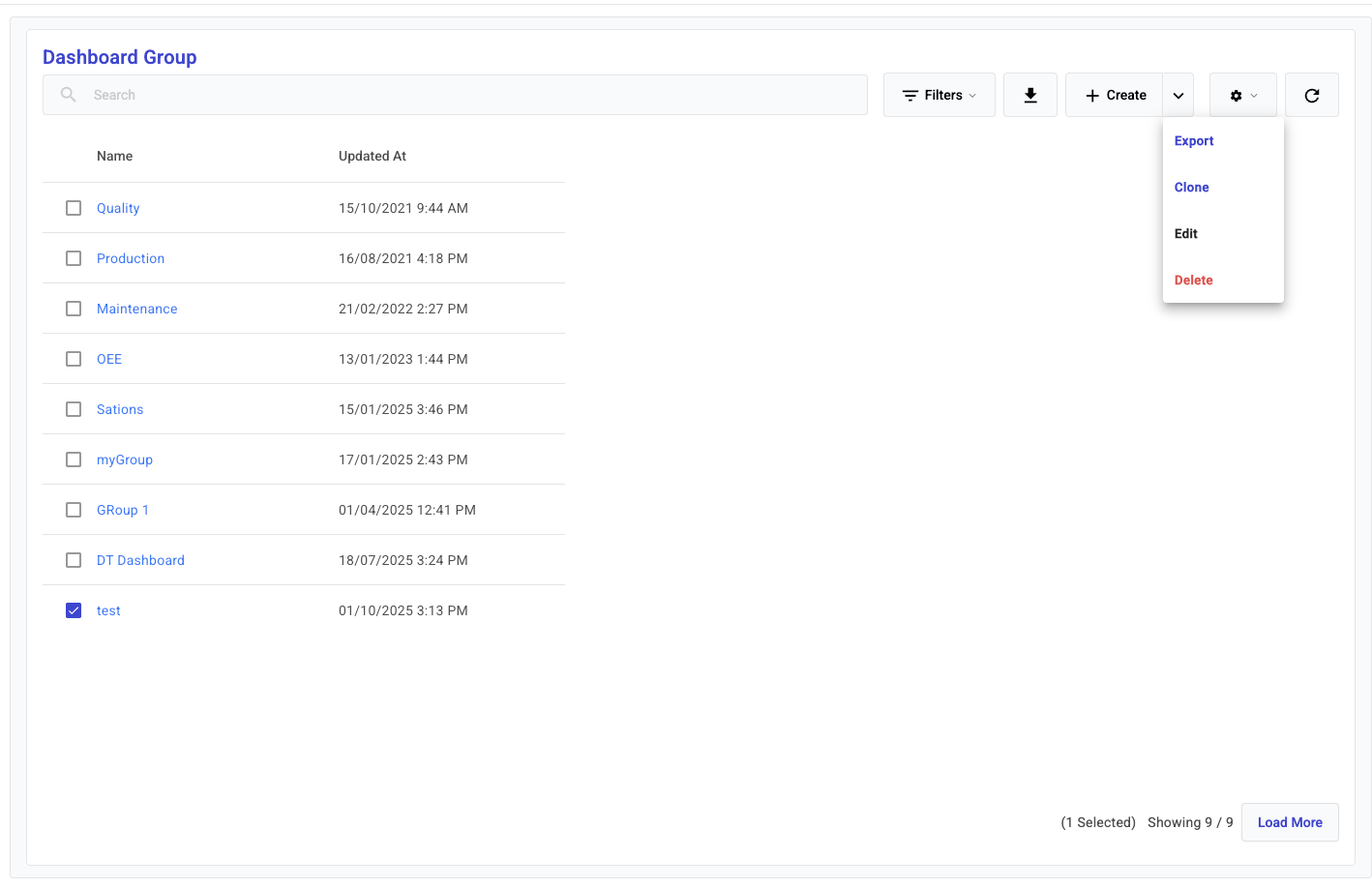
Select the Dashboard Group you want to delete, then click the top right drop down and ***Delete***.

<figure><img src="https://352909507-files.gitbook.io/~/files/v0/b/gitbook-x-prod.appspot.com/o/spaces%2FrNT40XJFAFlAhUX8CcQS%2Fuploads%2Fgit-blob-100168a5cbdfd227d18ada4214675f28e477cd45%2Fimage.png?alt=media" alt=""><figcaption></figcaption></figure>
{% endstep %}
{% endstepper %}
