> For the complete documentation index, see [llms.txt](https://help.tillit.cloud/tillit/llms.txt). Markdown versions of documentation pages are available by appending `.md` to page URLs; this page is available as [Markdown](https://help.tillit.cloud/tillit/knowledge-base/users/manage/user-channels.md).
# User Channels
Configure how TilliT sends you alerts and notifications through email, SMS, push, and in-app channels.
User channels define where TilliT sends your alerts and notifications. Navigate to your **User Profile** to view and manage your channels.
## Channel Types
TilliT supports four notification channel types. Only **EMAIL** and **SMS** require you to manually create a channel. **PUSH** and **NOTIFICATION** are managed automatically.
| Type | How it works | Manual setup required? |
| ---------------- | ------------------------------------------------------- | -------------------------------- |
| **EMAIL** | Sends alert emails to your email address | Yes |
| **SMS** | Sends alert SMS messages to your phone number | Yes |
| **PUSH** | Sends native browser or OS push notifications | No — managed via App Permissions |
| **NOTIFICATION** | Shows alerts in TilliT via the bell icon on the toolbar | No — enabled by default |
## Creating an EMAIL or SMS Channel
{% stepper %}
{% step %}
Navigate to ***User Profile > Channels***.
{% endstep %}
{% step %}
Click ***Create***.
{% endstep %}
{% step %}
Select the channel **Type** — either ***EMAIL*** or ***SMS***.
{% endstep %}
{% step %}
Enter the **Endpoint**:
* For **EMAIL**: your email address (e.g. `name@example.com`)
* For **SMS**: your phone number in international format (e.g. `+61491234567`)
{% endstep %}
{% step %}
Ensure **Active** is toggled on.
{% endstep %}
{% step %}
Click ***Confirm*** to save.
{% endstep %}
{% endstepper %}
### Email Channel
### SMS Channel
## PUSH Notifications
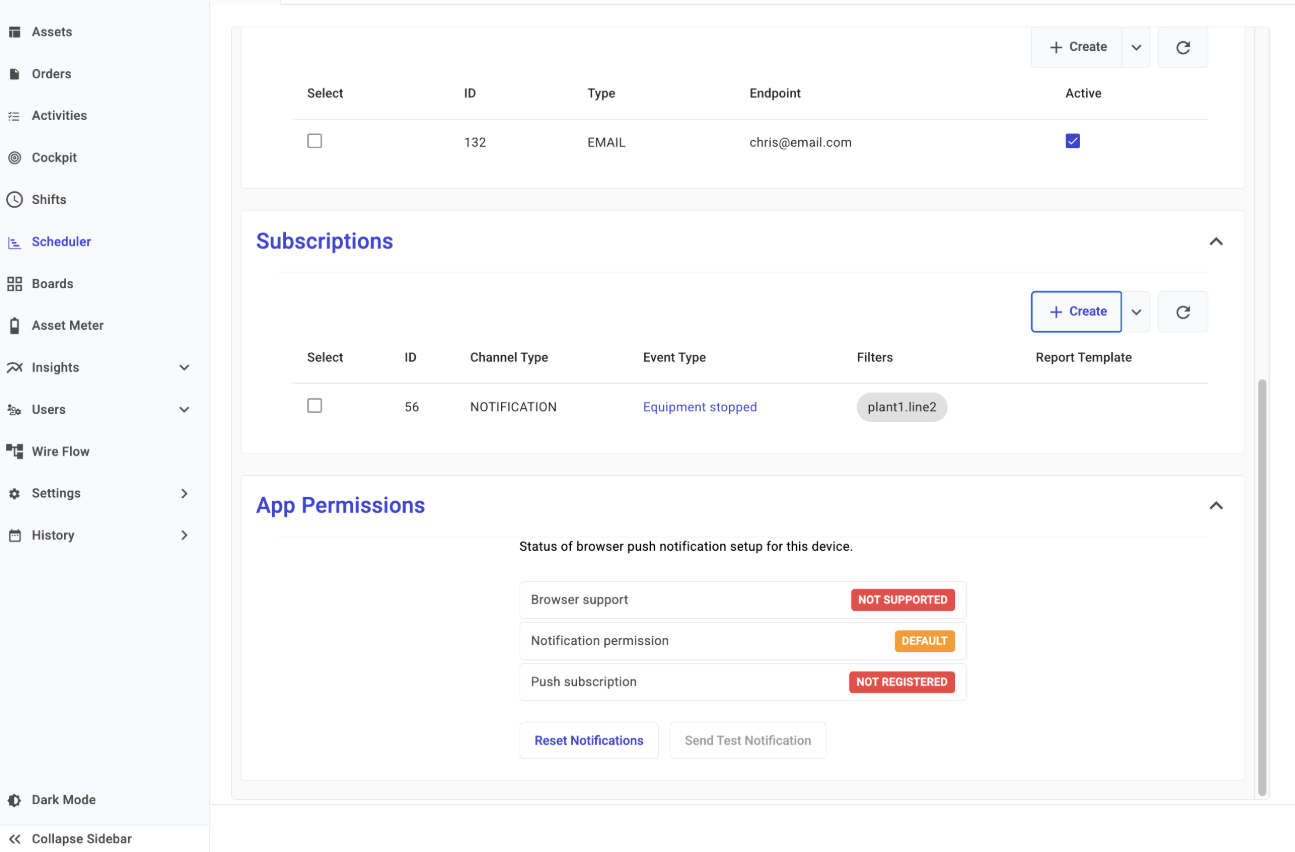
PUSH notifications are sent as native browser or OS notifications — no channel needs to be created manually. They are managed through your browser's App Permissions.
Navigate to ***User Profile*** and open ***App Permissions*** to view your push notification status:
* **Browser supports** — whether your browser supports push notifications on your device
* **Notification Permission** — whether you have granted your browser permission to display notifications
* **Push Subscriptions** — any active push subscriptions registered for your account
{% hint style="info" %}
To enable push notifications, grant notification permission when your browser prompts you. You can also update this in your browser's site settings at any time.
{% endhint %}
## NOTIFICATION - In-App Notifications
In-app notifications are built into TilliT and require no setup. Alerts are displayed through the bell icon on the TilliT toolbar. Any subscriptions using the NOTIFICATION channel type will appear there automatically.