
Hint
Hints allow you to provide additional context to any element in an activity.
In most cases, this will be basic text:
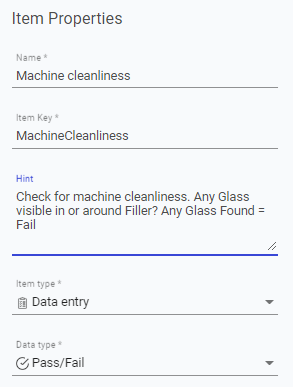
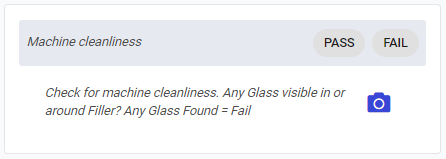
However, you may want to link to a web page or a shared file in your business ecosystem in this note as well.
For example, you may want to link to a government definition to aid newer employees on industrial terminology. You can do this using a HTML link:
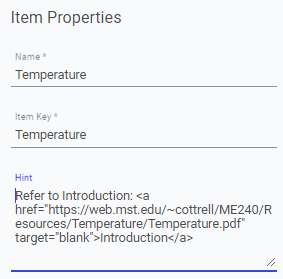
Here, the hint starts with plain text Refer to Introduction:
Next we add
<a href="https://web.mst.edu/~cottrell/ME240/Resources/Temperature/Temperature.pdf" target="blank" >Introduction</a>To break this down, we open with <a
<a href="https://web.mst.edu/~cottrell/ME240/Resources/Temperature/Temperature.pdf" target="blank" >Introduction</a>\
Then we add href="", inserting the URL of the webpage, or file, we wish to link to between the quotation marks.
<a href="https://web.mst.edu/~cottrell/ME240/Resources/Temperature/Temperature.pdf" target="blank" >Introduction</a>
To make sure this opens in a new window, this is followed by target="blank", which is the instruction to open the link in a new.
<a href="https://web.mst.edu/~cottrell/ME240/Resources/Temperature/Temperature.pdf" target="blank" > Introduction</a>
We then close this off with >
<a href="https://web.mst.edu/~cottrell/ME240/Resources/Temperature/Temperature.pdf" target="blank" > Introduction</a>
Next, we add the text that will display. In this case the word Introduction
<a href="https://web.mst.edu/~cottrell/ME240/Resources/Temperature/Temperature.pdf" target="blank" > Introduction</a>
Then finally close out the link with </a>
<a href="https://web.mst.edu/~cottrell/ME240/Resources/Temperature/Temperature.pdf" target="blank" > Introduction**</a>**
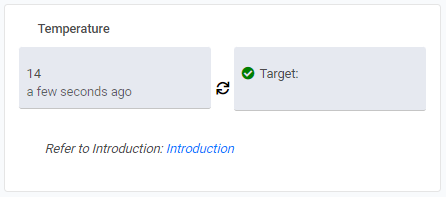
From the operator's perspective, this is what we see the following text in the hint:
Last updated