> For the complete documentation index, see [llms.txt](https://help.tillit.cloud/tillit/llms.txt). Markdown versions of documentation pages are available by appending `.md` to page URLs; this page is available as [Markdown](https://help.tillit.cloud/tillit/knowledge-base/setting-up-tillit/integrations/wire-flow/task-types-and-integrations/external-integration.md).
# External Integration
Wire Flow external integration tasks for calling REST APIs from within a workflow using the HTTP Request node.
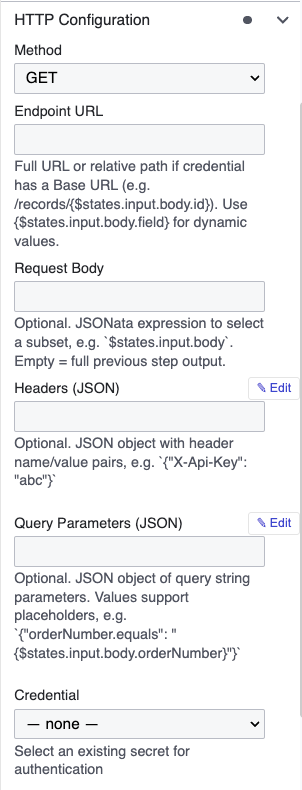
## HTTP Request
Calls an external REST API from within a workflow.
| Field | Description |
| ---------------- | ------------------------------------------------------------------------------------------- |
| **Method** | GET, POST, PUT, PATCH, DELETE |
| **Endpoint URL** | Supports dynamic values: `https://api.example.com/orders/{$.body.id}` |
| **Request Body** | JSONPath to send a subset of the state (e.g., `$.body`). Leave empty to send the full state |
| **Credential** | Select a saved credential for authentication |
The next task in the workflow receives the HTTP response in this format:
```json
{
"statusCode": 200,
"body": { }
}
```
Use `$states.input.body.` in a downstream JSONata task to extract response values.
{% hint style="info" %}
HTTP tasks require a saved credential. If none is selected, Wire Flow uses a fallback method. Credentials are managed in the Secrets Manager — accessible from the Workflow List page or from the HTTP task's Properties Panel.
{% endhint %}