> For the complete documentation index, see [llms.txt](https://help.tillit.cloud/tillit/llms.txt). Markdown versions of documentation pages are available by appending `.md` to page URLs; this page is available as [Markdown](https://help.tillit.cloud/tillit/knowledge-base/setting-up-tillit/articles/versioning-and-export.md).
# Versioning & Export
## Versioning
Versioning articles is the process of creating and managing different versions of an article over time. It involves tracking changes made to an article, including updates, corrections, and revisions, and storing each version as a separate record.
This allows users to access and review different versions of the article as needed, and to ensure that the latest version is always available for use.
Versioning articles can help to maintain consistency, accuracy, and transparency in documentation, and can be particularly useful in industries where regulatory compliance is important.
### Go back to previous versions
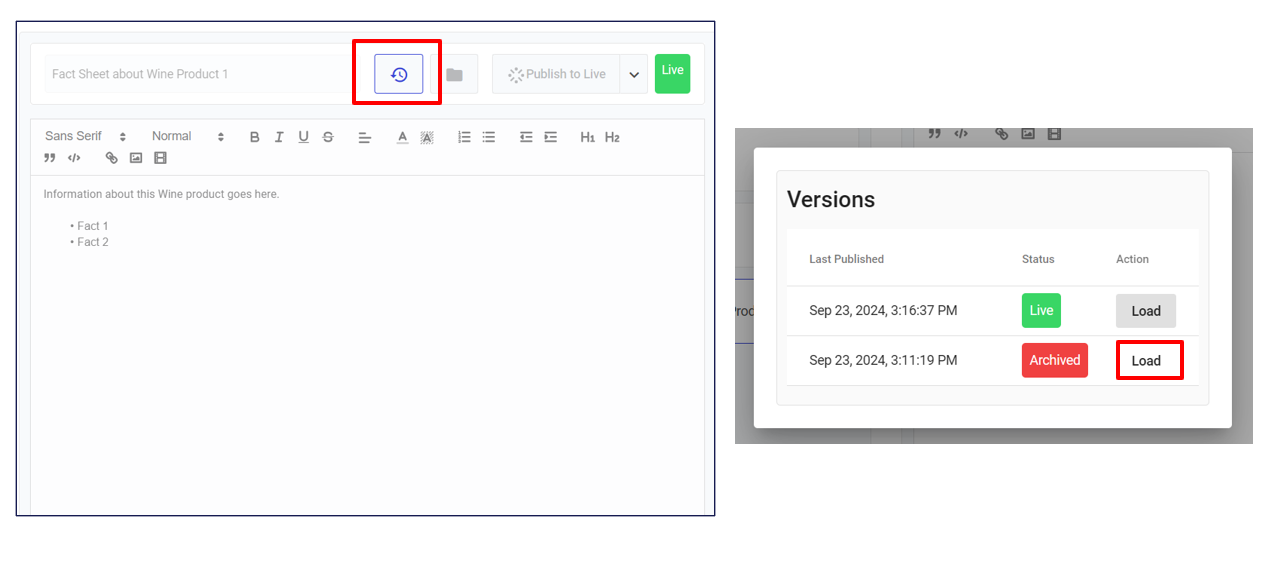
Click on the **clock icon button** that is part of the top right menu. Then you will be presented with different versions in the past, click **Load** next to the version you would like to restore.
When the old version is loaded, choose **Create new version (similar to** [Update an Article](/tillit/knowledge-base/setting-up-tillit/articles/managing-articles.md#update-an-article) **instructions)** if you wish to restore and publish, or edit this version and publish it.
## Printing and Downloading your Articles
This applies to the rich text articles that you create within TilliT DO.
Click on **Actions** button on the Article toolbar, and select **Download**.